Quad Equalizer: Complete Guide to Four-Band EQ, How It Works, Uses, Settings, and Best Practices
A quad equalizer is a type of audio equalizer that divides sound-shaping controls into four adjustable frequency bands. Instead of changing the entire sound at once, it allows you to work on different parts of the frequency spectrum separately. This makes it useful for music production, recording, live sound, podcasting, broadcasting, home audio, and many other applications.
The basic idea is simple. Sound contains different frequencies, from deep bass to very high treble. A quad equalizer gives you four sections for adjusting those frequencies. Depending on the design, each section may control frequency, gain, and bandwidth or Q. Some four-band equalizers are fully parametric, while others use fixed or semi-parametric frequency ranges.
Modern four-band EQ designs can be found in both hardware and software. Yamaha, for example, describes its Studio EQ as a four-band parametric stereo equalizer, while professional hardware such as the API SR24 provides four continuously adjustable parametric bands.
The term “quad equalizer” is not always the official product name for every four-band EQ. It is better understood as a general description of an equalizer with four usable EQ bands. Some manufacturers call these products four-band equalizers, 4-band parametric EQs, four-band sweep EQs, or simply EQs.
This guide explains what a quad equalizer is, how it works, what its controls mean, how to use one correctly, common frequency ranges, practical settings for different types of audio, mistakes to avoid, and how modern digital EQ technology has changed the way four-band equalization is used.
What Is a Quad Equalizer?
A quad equalizer is an audio processing tool with four separate frequency-control sections.
The word “quad” means four. Therefore, a quad equalizer normally provides four EQ bands that can be used to increase or decrease selected areas of the sound spectrum.
A typical four-band design may divide its controls into:
- Low
- Low-mid
- High-mid
- High
These four areas provide a practical way to shape most of the important tonal characteristics of an audio signal.
For example, the low band may be used to control bass, while the low-mid band can affect warmth and muddiness. The high-mid band can influence clarity and presence, and the high band can affect brightness and air.
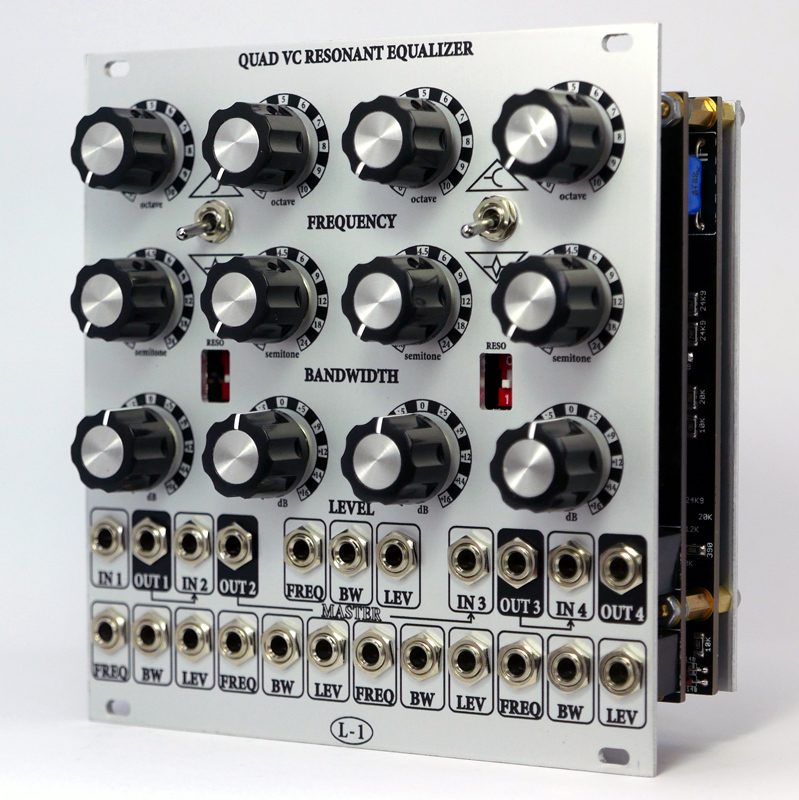
However, these descriptions are not fixed rules.
A professional four-band EQ may allow the frequency of each band to be moved over a wide range. The API SR24, for example, provides four peak/dip bands with adjustable frequency and gain, covering ranges from 20 Hz through 20 kHz.
This flexibility is one reason four-band EQs remain useful even though modern software can offer eight, 12, or even more EQ bands.
How Does a Quad Equalizer Work?
To understand a quad equalizer, it helps to understand frequency.
Frequency describes how quickly a sound wave vibrates. It is measured in hertz, or Hz.
Low frequencies are associated with deep sounds.
High frequencies are associated with brighter sounds.
Human hearing is commonly described as covering roughly 20 Hz to 20 kHz for healthy young listeners, although actual hearing varies significantly between people and usually changes with age.
An equalizer changes the level of selected frequencies.
If you boost a frequency range, that part of the sound becomes more prominent.
If you cut a frequency range, that part becomes less prominent.
A quad equalizer performs this process using four separate EQ bands.
Imagine a vocal recording that sounds too muddy.
Instead of turning down the entire vocal, you could make a small cut in the low-mid area.
If the same vocal sounds dull, you might make a gentle high-frequency boost.
The goal is not simply to make everything louder or brighter. The goal is to create a better balance.
The Four Main Bands of a Quad Equalizer
A traditional four-band EQ often uses four broad sections.
Low Band
The low band controls the lower part of the frequency spectrum.
This area contains:
- Bass guitar fundamentals
- Kick drum energy
- Deep male vocal tones
- Synth bass
- Low piano notes
- Room rumble
- Low-frequency noise
Too much low-frequency energy can make audio sound boomy, heavy, or muddy.
Too little can make it sound thin or weak.
The exact frequency range depends on the equalizer. For example, the API SR24’s low band covers 20 Hz to 200 Hz.
Low-Mid Band
The low-mid area is extremely important because many instruments and voices contain significant energy here.
It can influence:
- Warmth
- Body
- Thickness
- Mud
- Boxiness
- Fullness
Too much low-mid energy can cause several instruments to compete with each other.
A small reduction can sometimes make a mix sound clearer without requiring a large boost elsewhere.
High-Mid Band
The high-mid region is often associated with:
- Vocal presence
- Speech clarity
- Guitar definition
- Snare attack
- Instrument detail
- Harshness
Increasing this region can make a sound appear more forward.
Too much can make the sound aggressive or tiring.
This is one reason high-mid EQ should be used carefully.
High Band
The high band controls the upper portion of the frequency range.
It can influence:
- Brightness
- Air
- Sparkle
- Cymbal detail
- Vocal clarity
- Perceived openness
Too much high-frequency energy can make a recording sound sharp or harsh.
Too little can make it sound dull.
What Are the Main Controls on a Quad Equalizer?
The controls depend on the specific model, but a parametric four-band EQ commonly includes frequency, gain, and Q or bandwidth controls.
Frequency
Frequency determines the center point or cutoff point where the EQ acts.
For a peaking filter, selecting 100 Hz means the main boost or cut is centered around 100 Hz.
For a shelf or filter, the frequency control behaves differently.
Gain
Gain determines how much the selected frequency area is boosted or reduced.
Positive values increase the selected range.
Negative values reduce it.
For example:
+3 dB means a boost.
-3 dB means a cut.
The actual audible result depends on the filter type, Q, surrounding frequencies, and the original recording.
Q or Bandwidth
Q describes how narrow or wide the EQ adjustment is.
A higher Q generally creates a narrower adjustment.
A lower Q generally creates a wider adjustment.
This matters because the same 3 dB boost can sound very different depending on how wide the affected frequency range is.
Modern EQ software often displays this relationship graphically. iZotope’s EQ documentation, for example, describes Q or bandwidth as a control that determines how wide or narrow an EQ band is.
What Is a Parametric Quad Equalizer?
A parametric quad equalizer gives you control over the key parameters of four EQ bands.
Usually, these are:
- Frequency
- Gain
- Q or bandwidth
This makes it much more flexible than a simple tone control.
A fully parametric four-band EQ may allow all four bands to move across different frequency ranges.
The API SR24 is an example of a hardware four-band parametric EQ. Its four bands are peak/dip filters, and both frequency and boost/cut are continuously adjustable.
Yamaha also offers four-band parametric EQ designs in its professional audio ecosystem. Its Studio EQ provides four parametric peak filters, while the low and high bands can also operate as shelving or cut filters.
What Is a Semi-Parametric Quad Equalizer?
A semi-parametric four-band EQ offers some adjustable controls but does not provide full control over every parameter.
For example, a band might let you choose the frequency and gain but provide a fixed bandwidth.
Another design might offer a fixed set of frequencies with adjustable gain.
The Radial Q4, for example, was described by its manufacturer as a four-band semi-parametric equalizer. It is now discontinued, but its documentation provides a useful example of this type of four-band hardware EQ.
Semi-parametric designs can be easier to use because they reduce the number of decisions the user has to make.
What Is a Four-Band Graphic Equalizer?
A graphic EQ is different from a typical parametric quad equalizer.
Graphic equalizers normally provide multiple fixed frequency bands with individual sliders.
A four-band graphic EQ would have four fixed frequency areas.
A parametric quad equalizer, by contrast, usually allows the user to choose the frequency of each band.
This distinction is important.
Four bands do not automatically mean four fixed frequencies.
Quad Equalizer vs. Parametric EQ
A quad equalizer describes the number of bands.
A parametric EQ describes the type of control.
Therefore, a quad equalizer can be:
- Fully parametric
- Semi-parametric
- Graphic
- Digital
- Analog
- Hardware
- Software
This is why the phrase should not be treated as one specific product or technology.
It is a category description.
Quad Equalizer vs. Four-Band EQ
In most audio discussions, quad equalizer and four-band equalizer can be used to describe the same basic concept.
“Four-band EQ” is usually clearer and more common in professional audio documentation.
“Quad equalizer” emphasizes the four-band structure.
If you are shopping for an EQ, searching for both terms can help you find more relevant products.
Why Use Four Bands Instead of Twelve?
At first, having more EQ bands may sound better.
More controls mean more possibilities.
But more possibilities can also create more problems.
A four-band EQ encourages you to make fewer, more deliberate decisions.
This can be valuable when:
- Tracking vocals
- Mixing live sound
- Working quickly
- Shaping individual instruments
- Using analog hardware
- Learning EQ
- Making broad tonal changes
Modern software such as iZotope Neutron can provide up to 12 EQ nodes, along with dynamic EQ, sidechain processing, masking detection, and other advanced features.
Yet a four-band EQ can still be enough for many everyday tasks.
The quality of an EQ decision is usually more important than the number of available bands.
Quad Equalizer Frequency Ranges Explained
There is no universal frequency map for every four-band EQ.
Still, a useful starting framework is:
- Low: approximately 20–200 Hz
- Low-mid: approximately 100 Hz–1 kHz
- High-mid: approximately 500 Hz–5 kHz
- High: approximately 2–20 kHz
These ranges are similar to those provided by the API SR24, although actual products vary.
The overlap is intentional.
If the bands did not overlap, you would have less control.
Overlap allows the engineer to make smoother tonal adjustments.
Understanding Sub-Bass
Sub-bass is the deepest part of the audible spectrum.
It is especially important for:
- Electronic music
- Hip-hop
- Film sound
- Large sound systems
- Kick drums
- Synth bass
Too much sub-bass can consume headroom without making the sound obviously louder.
This is why cutting unnecessary low-frequency energy can sometimes improve a mix.
For example, a vocal recording may contain very little useful information below a certain point but may include microphone handling noise or room rumble.
A low-cut filter can remove that unwanted energy.
Understanding Bass
Bass provides weight and power.
Common sources include:
- Kick drums
- Bass guitars
- Synthesizers
- Low piano notes
- Low orchestral instruments
A bass boost can make a sound fuller.
A bass cut can create space.
The key is to avoid assuming that more bass automatically means better sound.
Understanding Low-Mids
Low-mids are one of the most important areas for clarity.
Too much energy here can make a mix feel crowded.
This is sometimes called muddiness.
For example, a vocal, guitar, piano, bass, and kick can all have energy in overlapping lower-mid regions.
If every instrument has a strong low-mid buildup, the mix may lose definition.
A controlled cut can create separation.
Understanding High-Mids
High-mids affect how close and present a sound feels.
This area can make speech easier to understand.
It can also bring out:
- Guitar pick attack
- Vocal consonants
- Snare detail
- Piano definition
- Instrument articulation
But high-mid boosts should be used carefully because the same region can also contain harshness.
Understanding High Frequencies
High frequencies contribute brightness and detail.
A small boost can make a recording feel more open.
A large boost can reveal:
- Hiss
- Sibilance
- Digital artifacts
- Cymbal harshness
- Background noise
A quad equalizer can help balance this area without affecting the entire frequency spectrum.
What Is a Shelving Filter?
A shelving filter boosts or cuts everything above or below a selected frequency in a broad way.
A low shelf affects frequencies below its selected point.
A high shelf affects frequencies above its selected point.
This is different from a bell or peak filter, which focuses on a narrower region around a center frequency.
Some four-band EQ designs allow the low and high bands to switch between parametric peak filters and shelving or cut filters. Yamaha’s Studio EQ is one example.
Shelving filters are especially useful for broad tonal changes.
What Is a Bell Filter?
A bell filter creates a boost or cut around a selected center frequency.
It is one of the most common EQ shapes.
For example, you could create a gentle cut around a frequency where a vocal sounds muddy.
The width of the bell is controlled by Q.
A wide bell affects a broader range.
A narrow bell targets a smaller area.
What Is a High-Pass Filter?
A high-pass filter allows high frequencies to pass while reducing low frequencies below a selected cutoff point.
It is often used to remove unwanted low-frequency content.
For example, a spoken-word recording may contain:
- Microphone handling noise
- Air conditioning rumble
- Footstep vibration
- Desk vibration
A high-pass filter can reduce some of these problems.
However, it should not be used automatically on every recording.
If you set the cutoff too high, you can remove useful low-frequency body.
What Is a Low-Pass Filter?
A low-pass filter allows low frequencies to pass while reducing higher frequencies above a cutoff point.
It can be useful for:
- Sound design
- Noise reduction
- Special effects
- Removing unwanted high-frequency content
- Creating a darker tonal character
As with high-pass filtering, the correct setting depends on the source.
Quad Equalizer for Vocals
A four-band EQ can be extremely useful for vocals.
A practical starting approach is:
First, listen for unwanted low-frequency noise.
Second, check whether the vocal sounds muddy.
Third, listen for presence and clarity.
Fourth, check whether the high end sounds dull or overly harsh.
Rather than using a fixed preset, adjust according to the actual voice and recording.
For one singer, a small low-mid cut may improve clarity.
For another, that same cut could make the voice too thin.
This is why EQ recipes should be treated as starting points rather than rules.
Quad Equalizer for Podcasting
Speech requires clarity more than extreme bass or treble.
A quad equalizer can help remove low-frequency rumble, reduce muddiness, improve intelligibility, and create a balanced tone.
A basic workflow is:
- Remove unnecessary rumble
- Control muddy low-mids
- Add modest presence if needed
- Control excessive brightness or hiss
The goal should be natural speech.
A podcast voice does not need to sound artificially bright.
Quad Equalizer for Music
In music production, EQ is often used for two major purposes:
- Corrective EQ
- Creative EQ
Corrective EQ fixes problems.
Creative EQ changes character.
For example, you might cut a resonant frequency from a guitar to make room for vocals.
Or you might boost a high shelf on a synth to create more sparkle.
Professional EQ tools often support both types of work. iZotope describes EQ as a tool for adjusting frequency balance and provides both corrective and enhancement-oriented functions.
Quad Equalizer for Guitars
Electric guitars often contain strong midrange information.
This means EQ can help determine how they sit in a mix.
A guitar that sounds too thick may need some low-mid reduction.
A guitar that disappears may benefit from a carefully chosen presence boost.
However, the best guitar EQ depends on the amplifier, microphone, cabinet, playing style, and arrangement.
EQ should therefore be judged in the full mix.
Quad Equalizer for Bass Guitar
Bass guitar needs to work together with the kick drum.
If both instruments dominate the same frequency region, the low end can become unclear.
A four-band EQ can help create separation.
Instead of boosting bass immediately, listen first.
You may discover that a small cut in another frequency range creates more clarity than a large bass boost.
Quad Equalizer for Drums
EQ can shape drums by controlling:
- Low-end weight
- Midrange body
- Attack
- High-frequency detail
Kick drums often require careful low-frequency management.
Snare drums can benefit from adjustments in the low-mid, midrange, and high-mid areas.
Cymbals are strongly influenced by high frequencies.
The best settings depend on the drum, microphone, room, and production style.
Quad Equalizer for Piano
Pianos occupy a very large frequency range.
A four-band EQ can help control:
- Low-end buildup
- Boxiness
- Midrange competition
- Brightness
Because piano already covers so much of the spectrum, small changes can have a noticeable effect.
A broad EQ move is often safer than several narrow cuts.
Quad Equalizer for Streaming and Home Audio
A four-band EQ can also be used outside professional recording.
For home listening, people may want to adjust the tonal balance of speakers or headphones.
For example:
- Too much bass can be reduced
- Thin sound can be given more body
- Harsh treble can be softened
- Dull audio can receive modest high-frequency enhancement
However, the best setting depends on the room, speakers, headphones, listening volume, and personal hearing.
Quad Equalizer for Live Sound
Live sound engineers often need to make decisions quickly.
A four-band EQ can be useful because it offers enough flexibility without requiring dozens of controls.
Live applications may include:
- Vocal microphones
- Instruments
- Monitor systems
- Main speakers
- Broadcast feeds
A common goal is to remove problematic frequencies and improve clarity.
Live sound also introduces feedback problems.
EQ can help manage feedback, but excessive narrow cuts can damage the natural sound.
Quad Equalizer and Feedback Control
Feedback occurs when sound from a speaker is picked up again by a microphone and repeatedly amplified.
Also read:Chas6D: What It Is, How It Works, Features, Benefits, and What Users Should Know
Certain frequencies can become especially problematic.
An EQ can reduce those frequencies.
However, feedback management is more than simply pulling down random frequencies.
Good microphone placement, speaker positioning, gain structure, room acoustics, and monitor levels are also important.
EQ is one tool within a larger system.
Analog Quad Equalizer vs. Digital Quad Equalizer
Four-band EQs exist in both analog and digital formats.
Analog EQ uses electronic circuits to change the frequency response.
Digital EQ performs the process mathematically.
Both can produce excellent results.
The difference is not simply “analog sounds good and digital sounds bad.”
Modern digital EQs can provide extremely precise control.
Analog EQs may offer particular circuit characteristics that engineers enjoy for their tone, workflow, or hardware interaction.
For example, the API SR24 combines four-band parametric EQ with transformer-balanced outputs and an analog circuit design.
Advantages of an Analog Quad Equalizer
Potential advantages include:
- Hands-on controls
- Immediate workflow
- Analog circuit character
- Hardware integration
- No software interface required
- Easy visual control
Some engineers also enjoy the way certain analog EQ circuits respond to boosts and cuts.
Advantages of a Digital Quad Equalizer
Digital EQ can offer:
- Precise frequency selection
- Adjustable Q
- Automation
- Presets
- Recall
- Visual frequency displays
- Multiple filter shapes
- Dynamic processing
- Stereo and mid/side options
Modern software can go far beyond a traditional four-band design.
For example, current iZotope Neutron EQ technology provides up to 12 EQ nodes, dynamic modes, sidechain functionality, masking detection, and multiple channel modes.
Quad Equalizer and Dynamic EQ
Traditional EQ applies a consistent change.
Dynamic EQ can react to the audio.
This is useful when a frequency is only problematic at certain moments.
For example, suppose a vocal sounds harsh only when the singer becomes louder.
A static EQ cut might make the entire performance dull.
Dynamic EQ can reduce that frequency primarily when the harshness appears.
Yamaha’s Dynamic EQ4 is an example of a four-band dynamic EQ design. Its documentation describes four bands, frequency and Q controls, and sidechain-based applications.
This is an important development in modern equalization.
Quad Equalizer and Sidechain Processing
Some advanced EQs can use another signal to control their behavior.
This is called sidechain processing.
For example, a guitar’s midrange could be reduced slightly whenever a vocal enters.
The result can create space for the vocal without permanently removing guitar frequencies.
Yamaha describes this type of application with its Dynamic EQ4, where an acoustic guitar’s midrange can be reduced when a vocal is present.
This approach can be more transparent than making a large permanent EQ cut.
Quad Equalizer and Mid/Side Processing
Modern digital EQs may also allow separate processing of the middle and sides of a stereo signal.
The middle often contains center-panned elements such as vocals and kick drums.
The sides contain information toward the left and right.
Mid/side EQ can therefore be used to shape stereo width and balance.
It should be used carefully.
Poor mid/side decisions can create an unnatural stereo image or compatibility problems.
Modern EQ software can provide these advanced channel modes. iZotope’s current Neutron EQ, for example, supports independent mid/side processing.
The Most Important Rule: Listen Before You EQ
One of the biggest mistakes beginners make is adjusting EQ before listening carefully.
Do not assume:
“Bass needs +3 dB.”
Instead ask:
“What problem am I hearing?”
Then decide whether EQ can solve it.
This simple change in thinking can dramatically improve your results.
Cut Before You Boost
Cutting is not always better than boosting, but it is a useful starting principle.
Suppose a vocal sounds muddy.
You could boost the high frequencies to make it seem clearer.
But the mud remains.
A small low-mid cut may solve the actual problem.
Similarly, if a guitar sounds buried, you might first remove a competing frequency from another instrument instead of boosting the guitar.
This can preserve headroom and create a more balanced mix.
Use Small EQ Changes First
Beginners often make large EQ moves.
Try smaller changes first.
A 1–3 dB adjustment can sometimes make a meaningful difference.
Large boosts and cuts are not automatically wrong, but they should have a clear reason.
If you constantly need extreme EQ, consider whether the real problem is:
- Microphone placement
- Instrument choice
- Recording quality
- Arrangement
- Performance
- Room acoustics
- Gain structure
EQ cannot fix everything.
Avoid EQ in Isolation
An instrument can sound excellent by itself and still be wrong for a mix.
For example, a guitar might sound huge when soloed.
But if it occupies the same frequencies as the vocal, it may cause problems.
The better approach is to listen to the complete arrangement.
EQ should help the parts work together.
Use Bypass to Check Your Decisions
After making an EQ adjustment, bypass the EQ.
Ask:
Does the change actually improve the sound?
If the answer is no, undo it.
This prevents “EQ for the sake of EQ.”
It is also easy to become impressed by louder sound.
If possible, compare at similar loudness levels.
A louder signal often sounds better even when the EQ change itself is not an improvement.
Common Quad Equalizer Mistakes
Boosting Everything
If every band is boosted, you may simply increase loudness and reduce headroom.
Using Very Narrow Q Everywhere
Extremely narrow cuts can make audio sound unnatural when used excessively.
Chasing Frequency Numbers
A frequency chart is helpful, but every recording is different.
EQing Before Fixing the Source
A poor recording cannot always be repaired with EQ.
Ignoring the Full Mix
Solo listening can hide important problems.
Overusing High Frequencies
Too much treble can create fatigue and harshness.
Removing Too Much Bass
Aggressive low-frequency cuts can make audio sound thin.
A Simple Quad Equalizer Workflow
A beginner can use this five-step process.
Step One: Listen
Do not touch the controls immediately.
Step Two: Identify the Problem
Decide whether the problem is bass, low-mid, high-mid, treble, or something else.
Step Three: Choose a Band
Select the EQ band that covers the problem.
Step Four: Make a Small Adjustment
Try a modest cut or boost.
Step Five: Bypass and Compare
Make sure the change genuinely improves the audio.
This workflow is simple, but it develops good EQ habits.
How to Set Up a Quad Equalizer for a Vocal
A general starting strategy could be:
Low band: remove unnecessary rumble if present.
Low-mid band: check for muddiness or excessive thickness.
High-mid band: adjust presence and intelligibility.
High band: control brightness, air, or harshness.
These are starting points, not universal settings.
Every voice is different.
How to Set Up a Quad Equalizer for a Podcast
For spoken word:
Start with unwanted low-frequency noise.
Then check muddiness.
Next, listen to speech clarity.
Finally, control excessive high-frequency energy.
Avoid making the voice excessively bright simply because it sounds clearer at first.
Natural speech is usually easier to listen to for long periods.
How to Set Up a Quad Equalizer for Music
For a mix:
Start with the low end.
Make sure kick and bass have space.
Then check low-mid buildup.
Next, listen for vocal and instrument clarity.
Finally, balance the high frequencies.
The goal is not to create the most extreme frequency curve.
The goal is to create a balanced mix.
Does a Quad Equalizer Improve Sound Quality?
An EQ does not automatically improve sound quality.
It improves sound when the adjustment solves a real problem or produces a desired creative result.
A poor EQ decision can make audio worse.
A good EQ decision can make the same recording sound clearer, more balanced, and easier to hear.
This distinction is important.
The EQ itself is only a tool.
The result depends on how it is used.
Does a Quad Equalizer Add Volume?
An EQ can increase the level of selected frequencies, but it is not primarily a volume control.
Also read:Woeken: Meaning, Origin, Uses, Common Mix-Ups, and What the Term Means Today
Boosting several frequency bands can increase overall signal level.
This can reduce headroom and potentially cause clipping.
Therefore, after major EQ boosts, check the output level.
Some modern EQs provide output gain controls or level compensation features.
Can a Quad Equalizer Remove Noise?
It can reduce some types of unwanted frequency content.
For example, a high-pass filter can reduce low-frequency rumble.
A narrow EQ cut can reduce a specific tonal resonance.
But EQ cannot remove every kind of noise.
Broadband hiss, changing background noise, clicks, and complex environmental sounds may require other tools.
Noise reduction, gating, spectral repair, or other processing may be more appropriate.
Quad Equalizer for Headphones
A four-band EQ can be used to adjust headphone frequency response.
This can help listeners who prefer:
- More bass
- Less bass
- More presence
- Softer treble
- More brightness
However, headphone EQ should be approached carefully.
Different headphones have very different frequency responses.
Personal hearing also varies.
A setting that sounds excellent to one person may sound poor to another.
Quad Equalizer for Speakers
Speaker EQ can help compensate for some tonal problems.
But room acoustics are often a larger factor than the speaker itself.
A room can create peaks and dips in bass response.
EQ can help, but it cannot completely fix physical acoustic problems.
Speaker placement, room treatment, and listening position remain important.
What Should You Look for When Choosing a Quad Equalizer?
If you are considering a four-band EQ, look at:
- Number of bands
- Frequency range
- Gain range
- Q control
- Filter types
- Analog or digital design
- Mono or stereo operation
- Mid/side support
- Dynamic EQ support
- Sidechain options
- Input and output connections
- Headroom
- Automation
- Presets
- Bypass functionality
The best choice depends on the job.
A beginner may prefer simplicity.
A professional mixer may want deeper control.
Why Four Bands Can Still Be Enough in 2026
Audio software continues to add more advanced processing.
Yet four-band EQ remains relevant.
The reason is practical.
Most tonal problems do not require dozens of adjustments.
A few well-chosen moves can solve many problems.
A four-band design can encourage better decision-making because it reduces the temptation to keep adding filters.
This is especially useful for people learning the fundamentals of EQ.
The Difference Between More EQ Bands and Better EQ
Having 12 bands does not automatically make an EQ better than one with four.
More bands provide more flexibility.
But flexibility is only valuable when it is needed.
A four-band EQ with excellent filters, good control, low noise, sufficient headroom, and a useful interface can outperform a poorly designed EQ with many bands.
This is why engineers often choose tools based on workflow rather than specifications alone.
The Future of Quad Equalizers
The basic four-band concept is unlikely to disappear.
However, modern EQs are becoming more intelligent.
Newer tools increasingly combine EQ with:
- Dynamic processing
- Spectrum analysis
- Automatic frequency detection
- Masking detection
- Sidechain control
- Mid/side processing
- AI-assisted suggestions
- Saturation
- Oversampling
- Loudness monitoring
For example, current iZotope Neutron includes EQ Learn, masking analysis, dynamic EQ behavior, sidechain functionality, and other advanced features.
The important development is not simply adding more bands.
It is making frequency processing more responsive and easier to understand.
Quad Equalizer and AI-Assisted Audio
Artificial intelligence is increasingly being used to assist audio engineers.
AI-assisted tools can analyze audio and suggest possible frequency adjustments.
These systems can be helpful, particularly for beginners.
But automatic processing should not replace critical listening.
An algorithm can identify a frequency pattern.
It does not necessarily know the artistic intention behind the recording.
Human judgment remains important.
Why Human Listening Still Matters
Music is not simply a graph.
A spectrum analyzer can show frequency energy.
It cannot fully tell you whether the vocal feels emotional.
It cannot decide whether a guitar should sound aggressive.
It cannot understand the artistic purpose of a distorted bass tone.
These decisions require listening and context.
That is why the best approach combines visual tools with careful listening.
Final Thoughts on Quad Equalizer
A quad equalizer is a practical four-band audio equalization tool that gives users control over different parts of the frequency spectrum. It can be used to correct problems, improve clarity, shape tone, create space between instruments, and develop a desired sonic character.
The term does not refer to only one specific product. It generally describes a four-band EQ design, which can be analog, digital, parametric, semi-parametric, graphic, static, or dynamic.
A well-designed four-band EQ can provide enough control for vocals, podcasts, music, instruments, live sound, home audio, and many other applications. Professional examples demonstrate how flexible four-band designs can be. The API SR24 offers four fully adjustable peak/dip bands, while Yamaha’s Studio EQ provides four parametric bands with additional shelving and cut options on the low and high sections.
The biggest lesson is that effective equalization is not about making the biggest changes. It is about making the right changes.
Start by listening.
Identify the actual problem.
Make a small adjustment.
Compare the result.
Then decide whether the change genuinely improves the sound.
Once you understand frequency, gain, Q, filter types, and the relationship between different parts of a mix, a quad equalizer becomes much more than four sets of knobs. It becomes a simple but powerful way to control the balance, clarity, depth, and character of audio.
Frequently Asked Questions About Quad Equalizer
What does quad equalizer mean?
Quad equalizer generally means an equalizer with four adjustable frequency bands. It is also commonly described as a four-band EQ.
Is a quad equalizer the same as a four-band EQ?
Yes, in most general audio discussions, the terms describe essentially the same type of EQ. However, manufacturers may use different names for their specific designs.
Is a quad equalizer good for beginners?
Yes. Four bands provide useful control without overwhelming beginners with too many parameters. It is a good way to learn the basic principles of EQ.
How many bands does a quad equalizer have?
A quad equalizer has four main EQ bands. The exact frequency ranges and available filter types depend on the specific model.
Can a quad equalizer be parametric?
Yes. Many four-band equalizers are parametric and allow users to control frequency, gain, and Q or bandwidth.
What are the four bands usually called?
They are commonly divided into low, low-mid, high-mid, and high bands. The exact frequency ranges vary by manufacturer.